
How to find someone's phone number: work vs direct
How to find someone's work or direct phone number: their LinkedIn profile, the company's main line, a Chrome extension, a B2B database and your AI assistant.

Key takeaways
- A work number is usually the company's main line. A direct number reaches the person, on an office direct line or their mobile.
- Start with what's public, their LinkedIn Contact info if you're connected and the company's website, then call the main line and ask for them.
- A Chrome extension such as SalesQL shows how many work and direct numbers it found on the profile you have open, before you spend a credit.
- Before you call, check the number and the calling rules where the person is, above all for mobiles.
Finding someone's phone number for work is harder than finding their email. Fewer people share a number, the one you find is often the company's main line, and calls come with stricter rules than email. This guide covers five ways to find a work or direct phone number: what each one returns, what it costs and where it falls short.
It's about business contacts: the people you'd call about a job, a sale or a partnership. It isn't about finding a private person's home number.
Work number or direct number: what you're looking for
There are two kinds of number you can find for someone at work, and they get you to different places.
| Work number | Direct number | |
|---|---|---|
| What it is | The company's main line, also called the switchboard or HQ number | A number that reaches the person: their office direct line or their mobile |
| Who answers | Reception, an automated menu or a dial-by-name directory | The person, or their voicemail |
| Where it comes from | The company's website, its Google Business Profile, its LinkedIn page | Their LinkedIn Contact info, their email signature, a B2B database |
| Good for | Getting put through, checking that someone works there | A direct conversation |
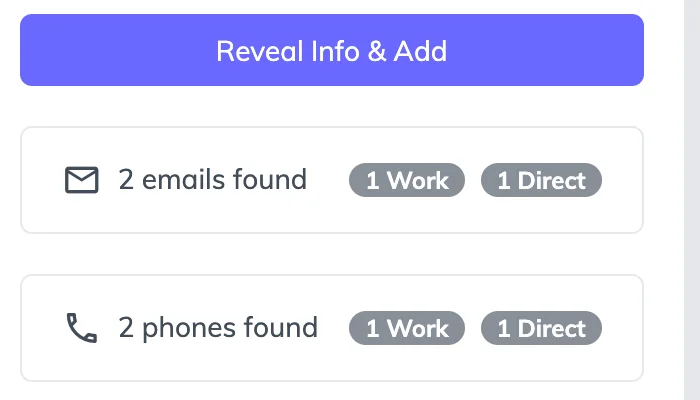
SalesQL labels each number the same way: Work for the company's number and Direct for the person's own. Before you reveal anyone, it shows how many of each it found, for phones and for emails.
Method 1: check their LinkedIn profile and the company's website
Start with what's already public. It costs nothing, and for a work number it's often enough.
- Open Contact info. On the person's LinkedIn profile, select Contact info, the link under their name and headline. If they added a phone number, it's listed under Phone, with its type, such as Mobile.
- Check the rest of the profile. Some people put a number in their About section, in Featured or in their banner image, above all people in sales, recruiting or consulting.
- Find the company's main line. Look on the company's website (the contact, press and investor pages), on its Google Business Profile and on its LinkedIn page.
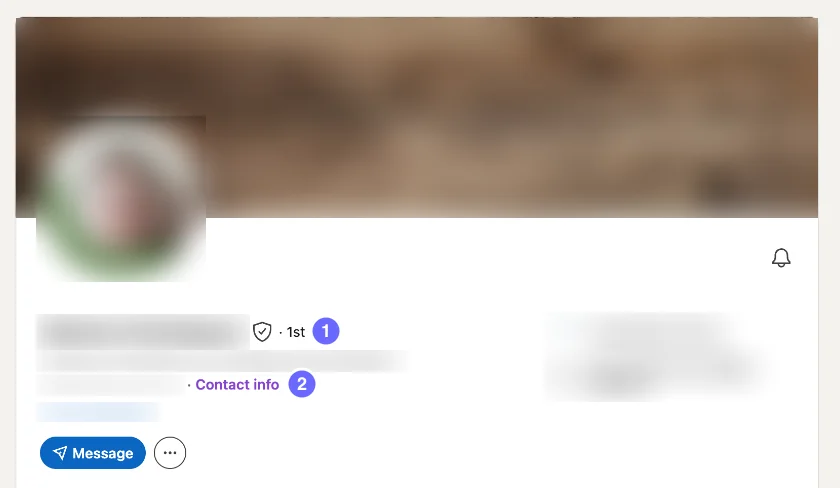
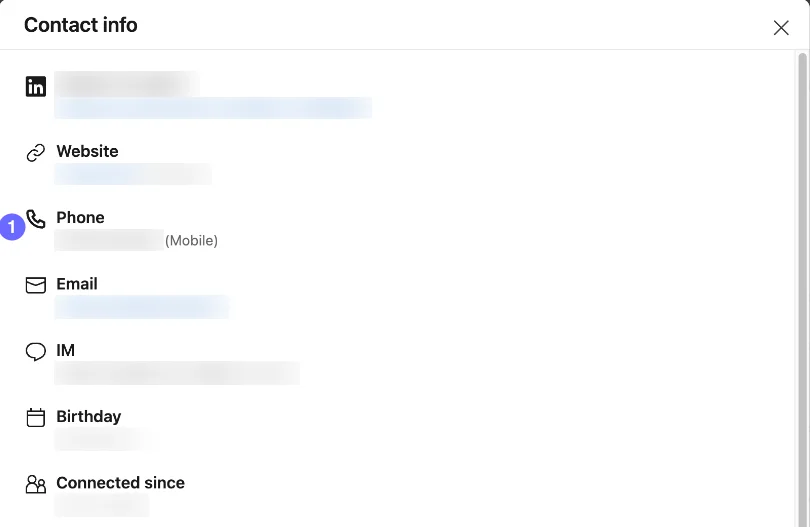
You only see their phone number if you're a 1st-degree connection. The person has to accept your invitation first; until then, Contact info doesn't show it. Look for 1st next to their name. The number someone uses to sign in to LinkedIn isn't shown on their profile unless they add it to Contact info themselves.
If you already have their email, ask for a number in a short message: say why you'd like a call and suggest a time. To find their email first, see how to find someone's email on LinkedIn.
Method 2: call the company's main line and ask for them
The main line is public for most companies, and it's still the most direct way to reach someone who doesn't share their number.
- Have their name and role ready. Ask for the person by name. If you only know the role, ask who handles it.
- Use the directory. Many automated menus let you dial by name or extension. The extension you're given is worth noting for next time.
- Say in one line why you're calling. Reception decides whether to put you through, so be brief and specific.
- Leave one short voicemail. Say who you are, why you're calling and how to reach you, then follow up by email.
A main line also confirms that the person still works there, which a number from a list can't.
Method 3: use a Chrome extension on their LinkedIn profile
A Chrome extension can show the numbers for the profile you have open, so you don't have to leave LinkedIn. Several extensions do this. If you use SalesQL as your LinkedIn email finder, its Chrome extension works like this:
- Open a LinkedIn profile. The SalesQL panel opens next to the profile.
- See what it found before you reveal. The panel shows how many phone numbers it found for the person and which kind: Work or Direct. It shows the same for emails.
- Select Reveal Info & Add. The extension shows each number, tagged Work or Direct, next to the person's emails, and adds them to your SalesQL contacts.
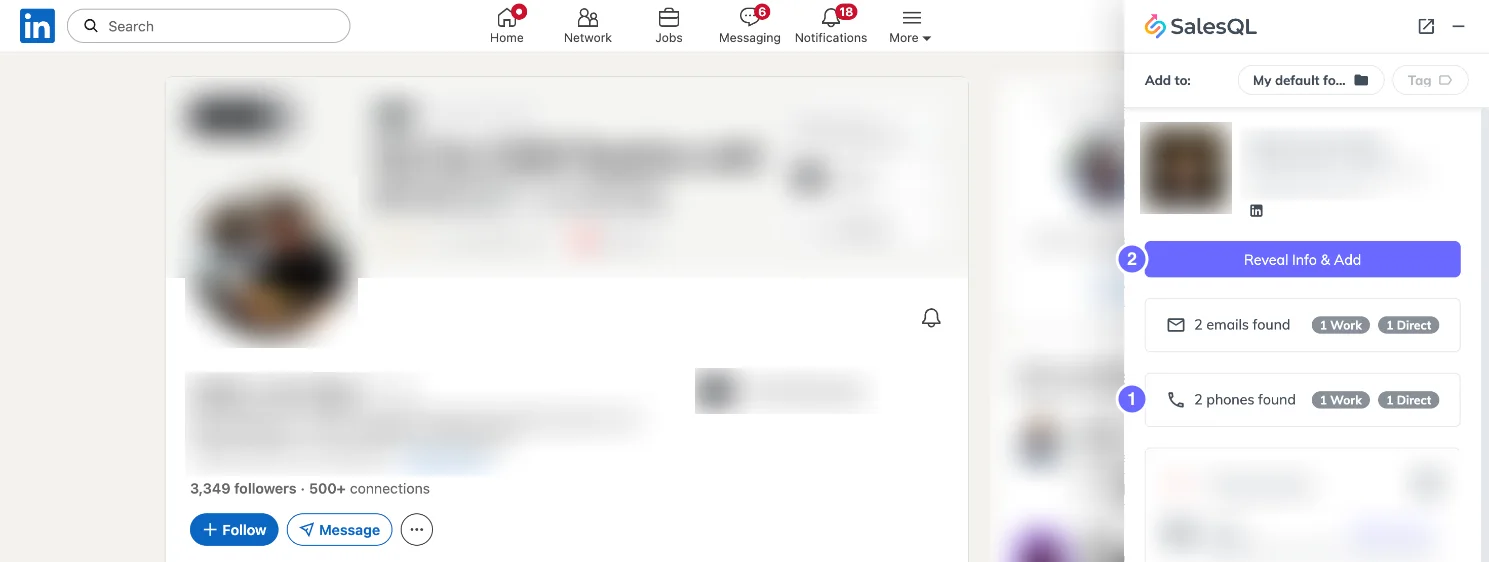
Phone numbers come with paid plans, from Basic. Today they don't cost extra credits: revealing a contact costs 1 credit, and its numbers come with it. If no email is found, you're not charged. On the Free plan, the extension shows that numbers exist and invites you to unlock them.
That's different from many tools, which charge extra for phone numbers: often several credits for each number, or from a separate phone balance. Our comparison pages list what each one charges.
Method 4: search a B2B database for a list
When you need numbers for many people, opening profiles one by one doesn't scale. A B2B database lets you search by role, company and location, and keep only the people with a phone number before you spend anything.
In SalesQL's Prospector:
- Describe who you're looking for, in plain language with AI search, or set filters such as job title and location.
- Keep only the people with a phone. In the Contact Details filter, under Data, leave only Phone checked.
- Show the phone columns. In Columns, turn on Direct phone and HQ Phone. The company's main number shows in full on every plan; a direct number shows masked until you reveal the contact.
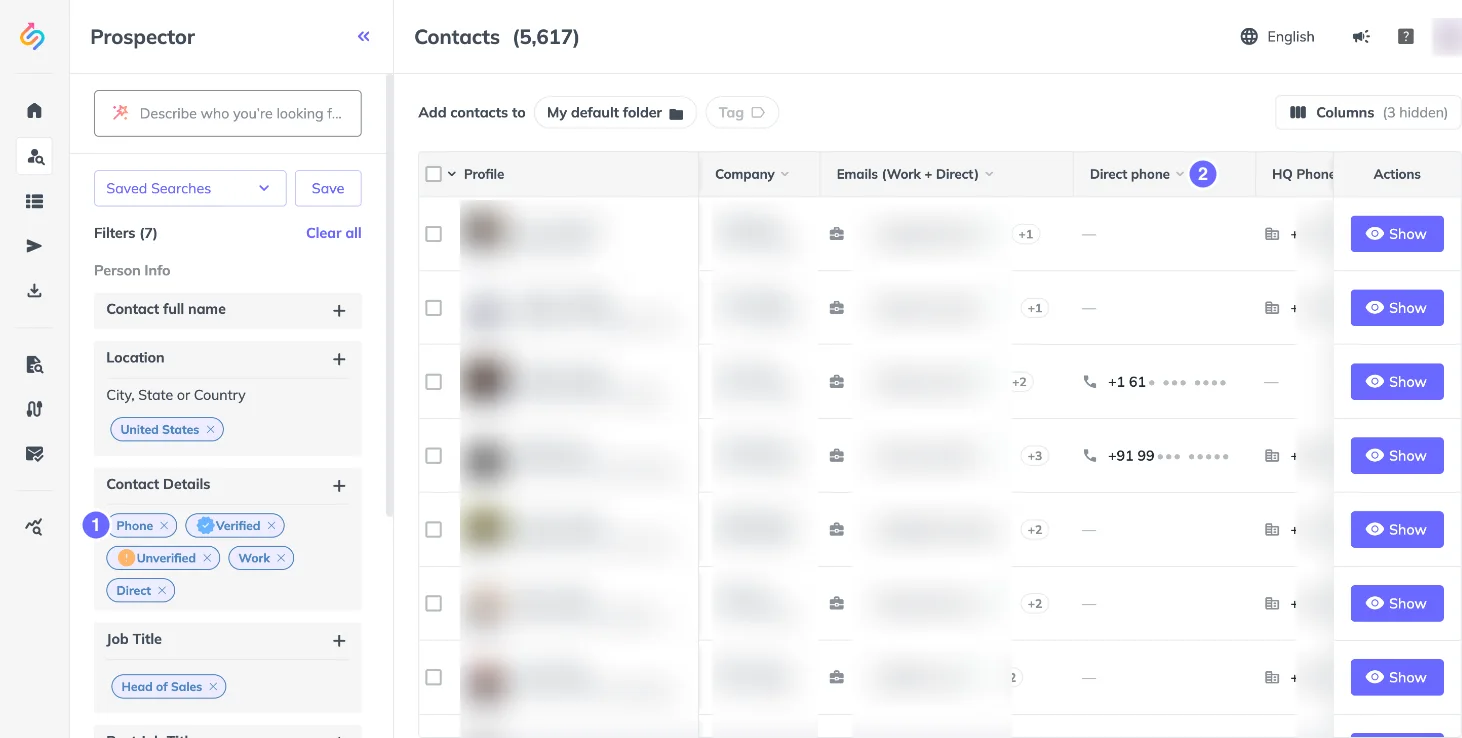
Searching doesn't use credits. Select Show to reveal a contact, at 1 credit each, with the same rules as the extension. Prospector runs outside LinkedIn, so it doesn't use your LinkedIn account. You can also upload a spreadsheet with names, companies or LinkedIn URLs and get it back with the numbers SalesQL finds.
Try SalesQL
Build a list of the right people
Search 185M+ professional profiles by job title, company, industry and location. Searching doesn't use credits.
Method 5: ask your AI assistant
If you already work in an AI assistant, you can ask it for a number without leaving the chat. SalesQL is an official plugin in ChatGPT. In Claude, Cursor and other AI assistants, SalesQL connects as a custom connector, and it also works in Gemini CLI.
Give the assistant a profile URL, or a name and a company:
Try this prompt
Use SalesQL to find the work and direct phone numbers for this LinkedIn profile: <paste the profile URL>
Try this prompt
Use SalesQL to find the direct phone number of <name>, <job title> at <company>
The assistant searches SalesQL, which doesn't use credits, then reveals the contacts you ask for with your plan's credits, each number labeled work or direct. Phone numbers come with paid plans; on Free, the assistant returns emails without phone numbers. A chatbot that only searches the web can return old numbers or make one up. Connected to SalesQL, it answers with SalesQL's data instead.
The MCP setup guide shows how to connect each assistant, and you can open SalesQL in ChatGPT to install the plugin.
Check the number before you call
An email can be checked with a server before you send it. A phone number can't, so check it yourself:
- Format it with the country code, such as
+1for the US and Canada or+44for the UK, so it works from any phone and in any dialer. - Know whether it's a mobile or a landline. The calling rules can differ for mobiles, as the next section shows.
- Check that the person is still there. Their LinkedIn profile shows their current role. If the company changed, a direct office line probably did too.
- When in doubt, go through the main line. It's the number least likely to be out of date.
SalesQL checks that each number has a valid format; it doesn't call it to confirm who answers.
Before you call: the rules
Calling rules are stricter than email rules, and they depend on where the person is, whether it's a mobile and how you place the call.
- US (TCPA). Calls made with an autodialer or with a prerecorded or artificial voice, AI voices included, need the person's prior consent to reach a mobile, and texts count as calls. There's no exception for B2B. A call you dial and make yourself isn't covered by that rule.
- US (Do Not Call). The National Do Not Call Registry covers residential numbers and mobiles. Business numbers aren't covered, but a personal mobile someone uses for work can be, so treat it as personal. Call between 8 a.m. and 9 p.m. in the person's time zone, and keep your own do-not-call list.
- UK (PECR). Before a live marketing call, check the number against the TPS and the Corporate TPS (CTPS), where companies register, and don't call anyone who asked you not to. A marketing text to an individual, including a sole trader, needs their consent.
- EU (GDPR and ePrivacy). A work contact's name and number are personal data. B2B outreach often relies on legitimate interest (Article 6(1)(f)): tell people where you got their details by your first contact at the latest (Article 14), and stop when they object (Article 21). Each country sets its own rule for marketing calls: in Germany, for example, a B2B call needs at least presumed consent.
- Argentina and Mexico. Argentina's Do Not Call Registry ("No Llame") accepts companies as well as people, so check it before a sales call, even to a business. Mexico's registry (REPEP) covers consumers, and it's not clear whether it covers business lines, so check it too.
This isn't legal advice
Rules change and vary by country and by type of call. Check the ones that apply to you before you call or text, and honor opt-outs promptly.
If you're on the other side, anyone can ask SalesQL to remove their details in the Privacy Center, under "Remove me from SalesQL".
Which method should you use?
For one person, start with their profile and the company's main line, then try the extension. For a list, start in a B2B database or in your AI assistant, and reveal only the contacts you'll call.
| Method | Work number | Direct number | Cost | Lists | On LinkedIn |
|---|---|---|---|---|---|
| Contact info and the profile | Partly | Partly | No cost | No | Yes |
| The company's website and main line | Yes | Partly | No cost | No | No |
| A Chrome extension (e.g. SalesQL) | Yes | Yes | Paid plan, 1 credit per contact | Partly | Yes |
| A B2B database (e.g. SalesQL Prospector) | Yes | Yes | Work number free, direct on paid plans | Yes | No |
| An AI assistant connected to SalesQL | Yes | Yes | Paid plan, 1 credit per contact | Yes | No |
Source: LinkedIn Help and SalesQL product documentation · Checked
Yes means the method can return it, not how often it finds one. Contact info shows a phone number only to 1st-degree connections. "Lists" is whether it works for many people at once (partly means a short list), and "On LinkedIn" is whether it runs on your own LinkedIn account. A main line gets you a direct number only when reception or the directory gives you one. In SalesQL, credits are per revealed contact: searching is free, phone numbers don't cost extra credits today, and if no email is found, you're not charged.
To try it on the profile you have open, add SalesQL to Chrome. It's free to install.
Frequently asked questions
Can I find someone's phone number for free?
Often, yes. Their LinkedIn Contact info, the company's website and a call to its main line cost nothing. In SalesQL, the company's main number is free on every plan in the web app. Direct and mobile numbers come with paid plans, from Basic, and today they don't cost extra credits, because they come with the contact's reveal.
How do I find someone's phone number on LinkedIn?
Open their profile and select Contact info. If they added a phone number, it's listed there, but only for their 1st-degree connections, so they have to accept your invitation first. A Chrome extension such as SalesQL shows the work and direct numbers it found for the profile you have open, connected or not.
What's the difference between a work number and a direct number?
A work number is the company's main line, the one reception or an automated menu answers. A direct number reaches the person, on their own office line or their mobile. SalesQL labels each number Work or Direct.
Is it legal to cold call someone's mobile number?
It depends on where the person is and how you call. In the US, a call you dial and make yourself is treated differently from an autodialed or prerecorded one, which needs prior consent to a mobile even for B2B, and mobiles can be on the Do Not Call Registry. In the UK, check the TPS and the CTPS before a marketing call. Other countries have their own registries and rules. This isn't legal advice.
Can I find someone's phone number with just their name?
Not reliably for a business contact, because many people share a name. Add the company or their LinkedIn profile URL. With a name and a company, you can call the company's main line and ask for them, or look them up in a B2B database such as SalesQL.
How do I keep my own number private?
On LinkedIn, edit your profile's Contact info and remove the phone number, or keep it off your profile. The number you use to sign in isn't shown unless you add it to Contact info. To have your details removed from SalesQL, use the Privacy Center on salesql.com.
How we checked
- LinkedIn Help: the Contact info section of your profilechecked
- LinkedIn Help: verify your phone number on LinkedInchecked
- Telephone Consumer Protection Act, 47 U.S.C. § 227checked
- FCC rules on telephone solicitation, 47 CFR 64.1200checked
- FTC Telemarketing Sales Rule, exemptions, 16 CFR 310.6checked
- FTC: National Do Not Call Registry FAQschecked
- UK PECR, regulation 21 (unsolicited calls)checked
- UK PECR, regulation 22 (electronic mail, including texts)checked
- GDPR (Regulation (EU) 2016/679), Articles 6, 14 and 21checked
- ePrivacy Directive (2002/58/EC), Article 13checked
- Germany: Act against Unfair Competition (UWG), Section 7checked
- Argentina: Law 26,951, National Do Not Call Registrychecked
- Mexico: Federal Consumer Protection Law (REPEP, Articles 18 and 18 bis)checked
- SalesQL plans and creditschecked
- SalesQL MCP setup guidechecked