Contact management

What is the Protected Folder?

Understand the Protected Folder, a folder at the top of your list that you can rename and use like any other, but that can't be deleted.

The Protected Folder is a special folder located at the top of the folders list.

It behaves like a regular folder, so you can edit its name and save or delete contacts inside it.

However, the folder itself can't be deleted.
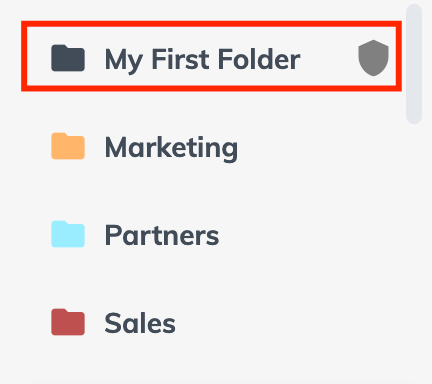
"My First Folder" highlighted in the folder list with the shield icon that marks it as protected

Pro tip

You can use this folder as an intermediate work folder to add contacts before moving them to other folders or send contacts via any SalesQL integration to third-party products, especially when working in a team.

More in Contact management

  • Contact organization: folders

    Organize SalesQL contacts with a folder-based strategy, treating each folder as a project and using tags, Assign To, and Lead Status inside it.

  • Adding contacts twice

    Find out how SalesQL merges contacts you add twice, when it charges extra credits, and how enriching the same contact through the API differs.

  • Moving my contacts from tags to folders

    Move contacts from a tag into a new folder by creating the folder, filtering your contacts by that tag, selecting them all, and using Move to Folder.

  • Starring your favorite folders

    Star your favorite SalesQL folders so they appear right below the Protected Folder, and unstar them to send them back to their place in the list.

  • Customize your Exports

    Choose exactly which fields to export from a SalesQL folder on any paid plan with the Custom template, then find the file in the Downloads section.

See all 6 articles in Contact management